Saturday, April 13, 2013

Samsung Galaxy Mega 5.8 announced : 5.8-inch display, 1.4 GHz dual-core processor, Android 4.2


Samsung Galaxy Mega 5.8 specifications

• 5.8-inch TFT display with 960 x 540 pixels resolution
• 1.4 GHz dual-core processor
• 1.5 GB RAM
• Android 4.2 Jelly Bean
• 8MP r camera with LED Flash
• 1.9 MP front-facing camera
• Dual SIM (GSM + GSM) with dual standby
• 8 Internal Memory, expandable memory up to 64GB
• 2600 mAh battery

Like its big brother The Galaxy Mega 5.8 would be available globally starting from Europe and Russia in May 2013. No word on pricing yet.

Samsung Galaxy Mega 6.3 is announced, first to come in Europe in May :D 6.3 INCH HD display, 1.7 GHz dual-core processor, Android 4.2


Whoa! a 6.3 inch device?

Samsung Galaxy Mega 6.3 specifications

• 6.3-inch HD TFT diplay with 1280 x 720 resolution
• 1.7 GHz dual-core processor
• Android 4.2 Jelly Bean
• 8 MP rear camera with LED Flash
• 1.9 MP front-facing camera
• 1.5 GB RAM
• 8/16GB Internal Memory and expandable memory up to 64GB
• 3200 mAh battery

The Galaxy Mega 6.3 would be available globally starting from Europe and Russia in May 2013. No information on pricing as of now

Friday, April 12, 2013

Sony CP-F1LSA Portable Charger Review


Google announces New Google Play Store User Interface Redesign, rolling-out now on Phones And Tablet On Android 2.2+


Do you like the new UI of Google Play Store?? 

Google has officially unveiled the redesigned Google Play Store for Android users. Google in a blog post said that the redesigned Play Store is slowly being rolled-out to all Android phones and tablets that are powered by Android 2.0 or above.
Worldwide, the new version will be available "over the next few weeks.

The new design focuses on bigger images that jump off the page. Similarly themed content is grouped together so you can hone in on a magazine to read or an app to try. As you move down the page, new recommendations continue to appear so there is always more to see and explore. 

Grudge Match: Sony Xperia SP vs Samsung Galaxy S 3 vs HTC One X+


Sony’s new Xperia SP has all the makings of a runaway success; however the launch timing isn’t exactly opportune. The SP by itself is a good


Sony’s new Xperia SP has all the makings of a runaway success; however the launch timing isn’t exactly opportune. The SP by itself is a good looking handset along with plenty of features and performance but yesterday’s flagships like the Samsung Galaxy S III and the HTC One X+ have now dropped in price and are available under Rs 30,000, which makes you think twice before splurging on the Xperia SP. With all three handsets running Jelly Bean and packing in similar features and performance, we turn to our beloved grudge match to sort out our conundrum. 

Sony Xperia SP

The design of the Xperia SP has been heavily inspired by the Xperia ZL and that’s a very good thing. Not only that, Sony has gone with a sturdier aluminium frame rather than a plastic one, which should give you a premium look and feel. The SP is no slouch either as it’s backed by a highly potent Qualcomm S4 Pro SoC, something that puts even quad-core offerings to shame. The handset also comes bundled with Sony’s Music service and Sony LIV streaming app.

Looks classy


Samsung Galaxy S 3

The Galaxy S 3 may have been the butt of many jokes when it first launched but almost a year later, no one’s laughing, especially with its new selling price. After a Jelly Bean update and many of the Note II features making its way to the S 3, it’s suddenly become a very viable option at this price. The S 3’s high points are the rich multimedia capabilities, the removable battery, expandable memory, potent processor and of course, the gesture-based features of TouchWiz.
Suddenly looks very tempting

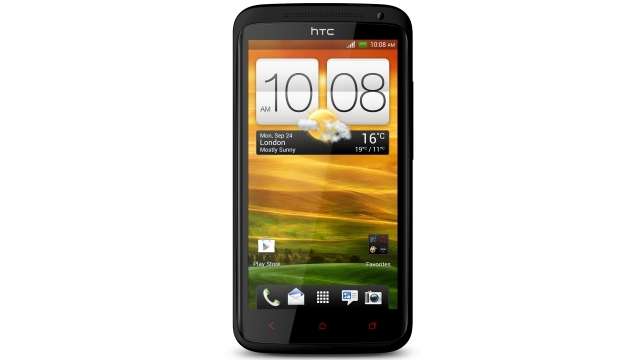
HTC One X+ 

We immediately fell in love with the One X+ during the course of the review since it fixed most of the issues of the One X and upped the specifications list while at it. The handset features double the storage of the One X, a faster Tegra 3 CPU, Jelly Bean and that wonderful burst mode that we’ve all come to know and love. With the massive drop in price after the launch of the One, it’s suddenly back on the radar.
Very good option after the price drop

Next, let's break down these specifications and lay them out in a chart for a head-to-head comparison.
A close one


The bottom line 
Shoppers in the Rs 25,000 - 30,000 price bracket have a tough task on their hands. Should you go for the S III or the One X+ or wait a bit for the Xperia SP to go on sale, which should happen in a couple of days? It’s tough and we can’t say for certain without having tested or played with the SP but no matter which you pick, you won’t be disappointed. The Xperia SP is the cheapest of the lot and will be slightly more comfortable in your hand due to the smaller screen. It also has the biggest battery of the lot and with an efficient dual-core like the S4 Pro, we could be looking at a superior battery life compared to the other two. The S III has its merits like a slimmer chassis, better multimedia support and if you’re big on gestures, then that’s the phone for you. The One X+ has the biggest storage capacity (out-of-the-box) but is also the most expensive. 

The bottom line is, if you have the budget, these are the three phones you should be considering and nothing else.

Monday, April 8, 2013

Lava launches XOLO A1000 in India

Lava Mobile has launched a new Android phone in India called the XOLO A1000. Unlike the previous XOLO X900 and the X500, however, the A1000 is not based on an Intel x86 processor.
The XOLO A1000 has a 5.0-inch, 1280 x 720 resolution IPS display with what Lava calls the One Glass Solution (OGS) that incorporates the display, the touch sensor and the glass in one layer, making the phone thinner and improving the image quality. The A1000 runs on a MediaTek MT6577 chipset with a dual-core 1GHz CPU and PowerVR SGX531 GPU.
Other than that there is 1GB of RAM, 4GB internal memory with microSD card slot, 8 megapixel camera with BSI sensor, 1.2 megapixel front camera with BSI sensor, 720p video recording, Bluetooth 4.0, Wi-Fi, Android 4.1 Jelly Bean and a 2,100mAh battery.
The Lava XOLO A1000 is priced at ₹13,999 in India ($259) unlocked and will be sold in black and white colors.

Sunday, April 7, 2013

iOS 6 vs Jelly Bean vs Windows Phone 8

iOS 6 vs Jelly Bean vs Windows Phone 8


F
irst Apple released iOS 6 at WWDC, then Microsoft announced the most awaitedWindows Phone 8, and recently at the Google I/O event, the newest Android iteration Jelly Bean (Android 4.1) was launched adding a new competitor to the two-horse mobile race. The new OS iterations were sheer improvements for Apple and Google to stay in the competition. On the other hand, Microsoft is here to prove its mettle and regain the ground that it has been losing on the mobile platform. It has tried hard and the feature set of the Windows Phone 8 will vouch for it. We decided to compare these three leading OSes, on the basis of what we know to be on paper, so far. 


User Interface
Apple’s iOS platform has been endowed with some nifty features over the year as it leaped forward with newer versions. It has ensured to keep its competitors on their toes. However, it is the user interface that still remains stagnant in the iOS 6, save minor visual changes. There hasn’t been much change and we still see the plain menu stretched across pages, and yes it lets you segregate apps into folders. Android ensures complete customizations, as you can pick your most favoured and frequently used widgets and place them on to homescreens as you wish. Now, it also allows you to resize these widgets. Microsoft’s Windows Phone 8 is quite similar to what we loved about Windows Phone 7.5. It offers a refreshing change with live tiles that can be resized.


Interface...iOS 6, Jelly Bean, Windows Phone 8

We like the Windows Phone 8 UI, not just for its fresh, refreshing and sheer attractive looks, but also for the personalization of the lively tiles. Though many iOS loyalists may not agree, iOS UI looks too old, dull and boring; we would love to see an overhauled iOS UI.

Maps
With the new iOS 6, Apple has shrugged off its reliance on Google Maps. The maker of popular ‘i’ devices now has its own Maps app that is powered by TomTom. The company just didn’t lay out a mapping app, but added some useful features too. Android users can access Google Maps, which are integrated with Google search listings, something we all pretty much like. Microsoft has been trying hard to keep up with the competition, and plans to leave no stone unturned with its new Windows 8 OS for phone and tablets. To rebuild its losing mobile ground, the software giant even ditched its own Bing Maps to favour the Nokia Maps.

Jelly Bean, iOS 6 and Windows Phone 8, all support turn by turn navigation, 3D views, and traffic information. However, Jelly Bean and Windows Phone 8 support offline mode for Maps, while iOS 6 doesn’t. Also, all iOS 6 features would be made available for users in India. Here, we think iOS 6, is comparatively new and could need some tweaks, while we don’t at all doubt the capabilities of Google Maps and think that Nokia Maps are good at what they do.

Voice assistant
Talking about voice assistants, iOS 5 stirred waves in the tech arena with Siri last year. Siri was an instant hit, although it didn’t really work that well. However, Siri has been taking intensive lessons and is launched with some good-to-know improvements in the iOS 6. Siri-integration within iOS platform also gets tighter. Android has some voice enabled abilities, and is working on a full-fledged assistant too. The Jelly Bean update adds some improvements to its speech recognition and voice search abilities. It now brings along the knowledge graph and also a built-in speech recognizer. Microsoft has entered the battle fully armed to face its competitors, Google and Apple. It also allows voice commands to make calls, send texts, search the web and more.

Siri is famous and improving and Google has added some nifty improvements to its voice commands. Though Microsoft is armed with voice commands, we aren’t sure how well it would be trained to do so.


New maps for iOS...goodbye Google maps

Social network integration
‘Mobile’ and ‘social,’ walk hand in hand, and phone makers know how much social networks matter to the masses. Last year iOS 5 had Twitter integration and Apple added Facebook integration this year, to make the iOS 6 completely socially integrated. Jelly Bean follows suit, and you get integrated social networks like Facebook, Twitter, Dropbox, Picasa, its own Google+, and more.  Windows Phone 8, has been learning the tricks of the trade and has also integrated Facebook, Twitter, LinkedIn and its own Windows Live.

Seemingly, Google offers more integration, and yes of course it is also trying to pimp its Google+.  Apple and Microsoft have also integrated the two most popular social networks.

Newest flavour of Android...
Mobile payment
‘Mobile payment’ is one promising aspect that leading mobile players plan to exploit to the fullest in the future. Apple has given NFC a miss, but stays in the game with its Passbook feature in the iOS 6. Passbook is a mobile wallet that keeps your debit cards, credit cards, tickets, and likewise in one place. It even offers updates to tickets in the passbook, and we may expect a lot happening in this space in the future. Google’s Jelly Bean brings in Google wallet, which is inclusive of mobile payments, rewards, offers, deals and more. The support for NFC ensures that Google’s mobile wallet is warming up for the mobile payment in the future. While Google has NFC and Apple has Passbook, Microsoft has both. Now, we don’t mean it has Passbook, but a similar feature called Wallet that stores all your credit/debit cards, rewards and more.

Calling features
Apple has added some cool calling features with the iOS 6, like ‘rejecting the call with a response.’ There are response templates, while one can even personalize their response. It also adds Do Not Disturb feature wherein the device doesn’t alert users about their calls/messages. However, the feature is smartly designed, so that if the number of calls from the same number exceeds 5 times, the phone recognizes the urgency and alerts the user. Android also allows users to create several replies, which can be sent as quick auto-replies, while declining a call and you can also filter out calls from specific people. Windows Phone has missed out on this bit. There is no Do not Disturb-kind feature nor the support for composing auto-response replies, while declining calls. However, it adds advanced filtering and call block options.

Apple and Google both offer call rejection functions, while Apple earns brownie points for its Do Not Disturb feature. Windows Phone 8 has some catching up to do here.

Video calling
Apple has spruced up its FaceTime, which can now be used on cellular networks, along with Wi-Fi. However, like everything else ‘Apple,’ its usage is restricted to ‘i’ devices. Google has Gmail and GTalk for Android (works on cellular network and Wi-Fi), that allows communicating with Gmail users on other device platforms. For Microsoft, it has to be Skype, the company had acquired the video calling service lately. Skype also supports other devices and platforms.

Google and Microsoft come with support for multiple platforms, while Apple’s FaceTime is limited to its platform.
Lively and attractive...

Apps
Apple’s App Store is inundated with apps and the number is growing with each passing day. Google has been taking its Market seriously and has redesigned the Google Play store experience with the Jelly Bean version. It has even re-christened the Android Market as Google Play, to take the experience beyond Android apps. It is even selling the Nexus 7 through Google Play. As beginners, Microsoft has also been adding new apps from the time it was conceived.

Apple scores high, not just for the number of apps, but also for the quality, Apple strives to offer malware-free apps by laying dowm some strict rules. Google has a growing number of apps, but has failed at controlling malware. Microsoft is still at the nascent stage, taking apps into account, especially while comparing it to the other two giants.

Conclusion
Though Microsoft’s Windows Phone 8 appears to be promising, Apple’s iOS 6 and Google’s Android Jelly Bean still appear to be superior in many aspects. We can clearly see the efforts Microsoft has put in to keep up with the existing competition, and is striving to deliver neck to neck competition to the leading mobile OSes. However, it is nice to see another addition to the mobile race, which is until now dominated by only Apple and Google (we do miss BlackBerry). However, the overall performance delivered by all three OS iterations and how soon they reach the market will make quite a lot of difference. We still believe that Microsoft will have to do some catching up initially, but may completely allure masses sooner or later (this again would depend upon how it prices its smartphones).

Friday, April 5, 2013

Top 10 non-stop running game apps for iOS and Android

Top 10 non-stop running game apps for iOS and Android


Sitting at the metro station or a bus stop perhaps with nothing to do but stare at people walking by? Or a coffee shop maybe, waiting for someone, perhaps stuck at that one clue trying to solve a mundane crossword? If you're the proud owner of an iOS or Android device, you should be making the most of it. Casual gaming apps are gaining popularity on both these platforms that not just keep you engaged but offer a whole new level of fun. 

A more recent category of gaming apps pertaining to non-stop running is catching up fast with games like Temple Run and Jetpack Joyride offering various levels of challenges without compromising on the fun factor. We have put together a list of 10 such endless running game apps that are challenging, addictive and extremely fun. Let's get you running!

1. Temple Run 
Developer Imangi Studios had thought this out well from the beginning. Right from day one, Temple Run has been a huge hit amongst the masses for its simple gameplay, missions and the one motive that keeps you hooked: keep running. Your reflexes are put to the ultimate test as you navigate through cliffs and ruins by sliding, jumping, turning and tilting. Collect coins to unlock various character, abilities and power ups that can be put to good use during the game. The iOS app offers social integration with Facebook, Twitter and even lets you Message, Mail or save your scores to camera roll.
The game's popularity knew no leaps and bounds and Imangi cashed in on the opportunity to release two spin-offs in association with Disney namely Temple Run: Brave and the more recent Temple Run: Oz along with a recently introduced sequel to the original hit. Temple Run 2 offers tons of new gameplay features and story lines offering more diverse and stunning environments with the introduction of new traps and hurdles along the way. The game now also has new characters, more power-ups, special achievements, better gameplay graphics and this time round a bigger monkey chasing you down the structures.

Temple Run (iOS, Free) 
Temple Run (Google Play, Free) 

2. Jetpack Joyride
The adventures of Barry Steakfries are never-ending. Jetpack Joyride is the brainchild of HalfBrick Studios, immensely popular for their creations such as Fruit Ninja, Fruit Ninja: Puss in Boots, Age of Zombies and another running game called Monster Dash. Jetpack Joyride features the adventures of Barry Steakfries, a disgruntled bureaucrat who breaks in to a secret laboratory and runs amok dodging dangerous objects like zappers, lasers, electricity fields and even guided missiles. Barry is equipped with a jetpack powered by machine gun propulsions to begin with, that help him on his missions.
The game offers many interesting missions like 'high-five 10 scientists in a run' or 'run 500m without collecting coins' and much more. Completing three missions in a row takes upgrades Barry's rank, that starts from 'Beginner'.Gamers can collect coins to purchase utilities from 'The Stash' which includes other jetpacks, snazzy outfits for Barry and can even stock up on items for later use. Players will get a boost of speed and power using the Lil' Stomper, Profit Bird and Crazy Freaking Teleporter, just a selection of the vehicles pickups available, all playable with one touch controls.

Jetpack Joyride (iOS, Free) 
Jetpack Joyride (Google Play, Free) 


3. Subway Surfers
A product of Kiloo Games and Sybo Games, Subway Surfers is based on Jake's running skills on train tracks amidst incoming trains and being chased by the station officer and his police dog. You'll find yourself mostly dodging objects by sliding, jumping and shifting to the sides in vibrant and colourful environments. The game animation gives a very child-like appeal and the music has a hint of naughtiness that doesn't go unnoticed. 

Collect shiny gold coins by not just covering the ground, but also somersaulting over train tops to purchase items for one-time use or upgrade power ups like Jetpack, Super Sneakers, Coin Magnet and 2x Multiplier.

Mystery boxes at various instances in the game award you with more coins and extra power-ups just in case you happen to run low. They also give you articles related to the other characters Tricky and Fresh that will unlock them. You can complete daily challenges by collecting all letters of a particular word to earn more coins or complete a mission set of 3 tasks. 

The app recently got updated with the adventure continuing in Rome, for both iOS and Android and now also includes other goodies like a paint powered jetpack, new hovering boards, an egg hunt (collect 100 eggs for a special prize), Roberto a new Italian scooter kid character and the ability to make your jetpack and other power-ups last even longer with extra power-up upgrades. 

Subway Surfers (iOS, Free) 
Subway Surfers (Google Play, Free) 


4. Rail Rush 
Developed by Miniclip.com, Rail Rush is a challenging on-the-move game set in underground mines. Hop in to the cart and start exploring 6 different surroundings amongst caverns, waterfalls, spider nests, dead cities and mushroom halls, tilting and swiping to avoid signals and obstacles on the rail tracks. 

You can complete missions such as "Jump up 20 times in a game", "Enter secret level five times" or Die in Dead City 5 times" and level up from a Passer By to Novice and other higher ranks. 

Collecting gold nuggets lets you purchase power ups for your cart such as Wood Ram, Super Magnet Force, Iron Grid etc. as well as other characters like Ace Upsleave, Axel Firechief, Charles Longshot and more from the Shop. You can also collect Rock Eggs that offer extra nuggets and other gems to complete your explorer's collection.

The game begins really fast after a certain distance and demands greater focus and presence of mind. The graphics look stunning on both platforms, which also include social networking integration from Facebook and Twitter.

Rail Rush (iOS, Free) 
Rail Rush (Google Play, Free) 
jj

5. Pitfall
A remastered version of the 1982 classic, Pitfall for iOS and Android follows the adventures of Harry in a volcanic jungle filled with treacherous twists. In this game from Activision, you'll find yourself dodging your way across narrow trenches, dark caverns, and cascading waterfalls, swinging past chasms and whipping away the occasional rattlesnakes, scorpions and crocodiles blocking your path. You must jump and slide to avoid obstacles such as fiery volcanic flames, tumbling ancient artefacts and narrow cliff side pathways.

The game has certain checkpoints marked by the presence of a giant colourful Macaw and a gold bell. You can choose to activate these check points by spending your loot of diamonds collected during the game. You can also use them for power-ups that aid in your running experience. The in-game store also offers added extras like costume changes, potions for extra speed and antidotes for when you're poisoned by the game's snakes and scorpions. 

While running you also come across rare gold tokens that provide you help in the form of a black Jaguar or a big black Bear to cover a certain stretch.

Though the jungle is just one aspect of it, you'll also be running through villages offering alternate path routes, even under mines riding in a cart over spilled lava and riding a motorcycle in part sequences. Since the paths are very random, you'll always be surprised while playing. Like the other games in the list so far, Pitfall doesn't miss out on social media

Pitfall (iOS, Free) 
Pitfall (Google Play, Free) 

6. Into The Dead
It's safe to say that everyone loves a zombie game whether it's intense like Dead Trigger and Age of Zombies or light hearted like Plants vs. Zombies. A first-person endless runner game exclusive for iOS from PikPok, Into the Dead let's you experience a grim zombie apocalypse by simply running in the opposite direction. As you'd like a true zombie game to be, Into The Dead offers an intense and visceral zombie-escaping experience in the wilderness with your own breathing sounds occasionally overshadowed by zombie cries.

Eventually you will succumb to the flesh eating zombies, but you're also rewarded for your success with coins. Those coins can be used to pay for perks, which cost little and last just one round. It's easier to survive when you can pay to start with a gun, or to jump ahead 1500m, hold more ammo or find more weapon crates. 

Coins can also be used to skip missions or unlock new weapons early. Along with the zombie-slaying Massacre mode, they add some much-needed variety to the game.More powerful weapons unlock as players complete goals like reaching distance and zombie kill milestones. The shotgun has a scatter fire and the chainsaw can slice through multiple zombies.

There is no story, apart from the fact that your chopper crashes and you're invaded by a horde of flesh eating zombies. There is no ending so to say. All you do is continue to run as far as you can engulfed in thick fog and the game keeps you at the edge of your seat. A recent update has brought new Footballer and WWII zombies, kill based scoring and a new map layout.

Into The Dead (iOS, Free) 


7. Agent Dash
Here's a game that lets you don the Bond avatar in true style. As the name suggests, you're Agent Dash and your mission is to sprint as far and as fast as you can through a series of dangerous yet gorgeous environments of enemy bases. The game's animation resembles a lot like Disney's art style. The soundtrack is very spy-like and so are the subtle touches like those of footsteps. 

Players will find themselves starting each round with jungle surroundings that itself is pretty challenging. It will take more than a while before you can witness other bases such as the lava lair or the town. 

Swipe gestures have Dash sidestep, leap and slide beneath incoming obstacles such as laser beams, falling trees, skidding trucks and fiery lava while he also tries to collect stray diamonds, which are used to purchase new gadgets and unlock new agents. Of course, as a free title, those gems can be bought through in-app purchases.

There's a long list of Objective challenges to complete, each one rewarding players with an extra percentage multiplier on their score. Tapping destructible objects has your agent open fire with one of two pistols.

The game offers plenty of spy gadgets to help you on your way like jetpacks, parachutes, magnets and even slow-mo to slow down time. In addition to Agent Dash, players can unlock other runners, including a female agent and some distinctly familiar villains, like one character with an iron jaw and a short fellow with a deadly hat. 

Though most of those unlocks are simply new outfits for existing characters, the customisation is taken care off and it's better than dealing with an array of individual items. Facebook integration allows you to connect and compete with friends.

Agent Dash (iOS, Free) 
Agent Dash (Google Play, Free) 

8. Run Like Hell
The name just says it all. That's the basic aim and once you play Run like Hell, you'll know that it is difficult to keep up. The game is a frantically paced run-and-jump platformer where you'll mostly see yourself sliding, climbing, stringing, jumping and crawling to safety and avoid the clutches of the native hungry tribals coming at you with spears for a juicy spit roast!

The game has three game modes namely endless, story and time-trials set in various environments like ancient ruins, night jungles and beach, village and caverns. Every environment has its own set of obstacles such as boulders, treasure chests, turtle shells on the beach; mad bee hives, anger tribal women in night trails.

While Endless mode can get you running until the tribals catch you, in time trials you can challenge yourself to complete a stage in a stipulated time. Story mode has comic cut scenes as you progress in the storyline.

In case you trip and fall, it will take a few seconds before you pick up speed again. At various points you can collect fog or thunderbolts to slow down the tribals along with the letter 'A' connoting Adrenaline, which boosts your speed should you choose to use it. YOu can spend coins in the Store to purchase various doses of Adrenaline.


You can also play through the Yeti, Avalanche and Heartbreaker bonus modes. Collecting coins unlocks other levels and additional game modes. Reaching milestones The graphics and gameplay experience for both iOS and Android are really smooth and will keep you hooked for hours. 

Run Like Hell (iOS, Free) 

Run Like Hell (Google Play, Free) 

9.Totem Runner
An iOS exclusive from Chillingo, Totem Runner is one of a kind. You're a warrior trying to secure harmony and happiness to the earth, sowing flowers as you go along. The game has an upbeat soundtrack that ensures you'll be surprised every step of the way. 

The initial stage, Waterfalls Valley is a tutorial to get you acquainted with the various kind of totems you'll be using in your journey. Eternal Wind Totem makes you fly with Eagle Wings, which can soar and dodge cliffs and spikes in air.

Nature's Rage Totem transforms you into a boar form to smash obstacles and enemies on the ground. The Dragon's Light Totem is an ancient force you can summon with enough gems that easily gets you through stretches until the next checkpoint arrives. But you'd want to spend them wisely since collecting gems is not all that easy and only after 50 odd gems or so, you'll be awarded with one Dragon Light Totem.
You need to constantly sow flowers in the earth as you're running that fills the three stars in each stage and unless you accomplish that, other episodes in the game won't unlock. While in most levels getting two stars is still manageable but collecting all three requires great skill and careful timing. At times, you'll even find yourself memorising a certain stretch since it will be unknown to you the first time and the sequence can be very long as well.

Mastering the quick switch between one form into human and back, over and over is a real challenge and this comes with a combination of before hand knowledge and quick reflexes. At times you need to swap between bird and boar mid-flight or on the trailing edge of an attack. The difficulty level only increases as you progress.

The graphics of the game differentiate it from the rest in this list offering a very raw experience with each level featuring a vibrant colour scheme and fantastical backdrops -- forests, castles, villages and other strange things. The background layers give a beautiful parallax effect that just can't be ignored. 


10. TheEndApp
Besides offering a perfect end to our list, Goroid Games' TheEndApp employs the basic skill of running for as long as you can. It is a behind-the-back endless runner, with a currency and IAP system and tilt and swipe controls and uses original water effects.

The environs offer a refreshing look with urban hazards, striking looks, light-hearted tone and the damage model it applies. Obstacles along the way include lava pits, cracked cement, jack-knifed trucks and broken car. There are ramps at various points to help you cover longer distances. There are 28 days with 5 challenges each day.  

Unlike other games, TheEndApp offers you multiple chances to keep running even if you bump into an obstacle. For instance, if you bang into a car while tilting to pick up a snaking line of duct tape, your screen becomes a shade of crimson for a few seconds. Another differentiating factor that is themed to the game is that while most other games allow you to collect coins or gems, The End App offers duct tape. 

You can unlock different characters like Fed the Zombie, Suzy, Yukiko and Bobby with duct tape collections as well as buy PowerUps and other Extras from the Camp. In case you're greedy for additional duct tape, you can Like TheEndApp on Facebook (5000 DT), Follow them on Twitter (for 5000 DT), connect with friends on Facebook (for 10000 DT) and so on.

You can explore different surroundings in three different game mode - The End Origins, The End Pro Zone and The End London Apocalympics. While Origins is free for all, the Pro Zone needs to be bought. However, free users can get a Single Ride Pro Ticket for 10,000 duct tape to gain entry in the Pro Zone without having to purchase the episode separately. The London version is accessible only if you have Pro.

TheEndApp (iOS, Free) 
TheEndApp (Google Play, Free) 

Thursday, April 4, 2013

Seagate Wireless Plus review

Seagate Wireless Plus review


Seagate recently announced two new products in the Indian market. While Seagate Central is designed to be the storage hub of your home/ small office network, Seagate Wireless Plus aims to offer portable, wireless storage on the go. At Rs. 16,000 for 1TB storage, Seagate Wireless Plus may sound expensive and the question is, do you get enough value in return? Let's find out.
Design/ Setup
Seagate Wireless Plus looks like any other portable hard disk from the outside, although it's slightly wider and heavier in order to accommodate the extra circuitry needed to provide wireless access and power backup. It comes with two indicator lights - a charging/ low battery indicator, and the broadcast LED that lights up when the drive is ready to accept Wi-Fi connections.
The drive comes with just the power button on one side and a proprietary charging connector on the other. The bundled charger is rated at 5V/ 2A, and it takes a little over 3 hours to fully charge the hard disk when it has no juice left. The drive can also be charged via USB, but that takes considerably longer.
Setting up the drive is pretty simple, thanks to the accompanying Quick Start Guide. Switch on the power button and wait for the broadcast LED to turn from blinking to solid blue. Though the Quick Start Guide says this may take up to a minute, in our experience this took less than 15 seconds every time we powered on the drive.
Next step is to download the Seagate Media app from App Store or Google Play on to your iPhone, iPod touch, iPad or Android smartphone. Once the app is installed, do not launch it right away, and first connect your device to the Wi-Fi network titled Seagate Wireless. Once you're connected, launch the app, where a brief tutorial will walk you through all the essentials.

In case you are wondering how you are supposed to stay connected with the world if you are connected to this Wi-Fi network, there's mixed news. If you are near a Wi-Fi network (say office or home), you can configure your Wireless Plus to connect to this Wi-Fi connection and you can continue to enjoy Internet access, even as you are hooked to the Seagate drive. However, if you are on the move, which is very likely given this is a portable drive, you're out of luck, since you'll be unable to use your phone's 2G/ 3G data connection while you're connected to the Wireless Plus over Wi-Fi. You could solve this by getting a mobile Wi-Fi hotspot, but that's a topic for another day.
You can connect your PC/ Mac to the Wireless Plus over Wi-Fi or via USB, just like any other hard disk (USB 3.0 is supported), and load up on media. Transfer speeds are average; comparable to other regular portable drives. The hard disk is pre-formatted with NTFS but you can format it as HFS if you will be using it only on a Mac. If you'll use it on a PC as well as a Mac, or just PC, leave the drive as it is. Seagate has wisely bundled a copy of Paragon NTFS that Mac users can install to write to this drive, even if it¹s NTFS-formatted. If this sounds like jargon, you probably don¹t need to worry about this stuff at all - Seagate installer will guide you through the steps when you connect the drive for the first time.
Usage/ Performance
The Seagate Media app on your mobile device is at the centre-stage of your Wireless Plus experience. The app lets you browse the content of your Wireless Plus under tabs titled Videos, Photos, Music and Documents. The app plays most popular video formats, though it has to download stuff from the Internet to enable playback for some formats, which it does with minimum fuss. We were able to stream two full-HD movies simultaneously off the drive without experiencing any sort of buffering delays.
The Music player comes with playlist support, while Photos let you view slideshows, amongst other things. Documents lets you browse other kinds of files, though you must have third-party apps installed on the device to view/ edit them. The iOS app comes with AirPlay support to stream movies/ music to Apple TV, Airport Express or other AirPlay-compliant devices.

You can even upload stuff from the mobile device to the hard disk, from within the app. For example, we used the app to backup the precious photos we clicked on the iPhone straight to the drive, all over Wi-Fi.
The app comes with a host of settings that let you control the drive. For starters, there's an option to password-protect the Seagate Wireless Wi-Fi network (recommended) or to change the network name (SSID). You can also check for firmware updates, or even restart the drive or put it to sleep - very handy, if the drive is sitting, say, when you are done watching the movie and the drive is sitting in your backpack. The app also informs you about the number of clients that are connected to the drive right now and the amount of juice remaining in the drive.
Seagate rates Wireless Plus at 10 hours of usage, though we got around 6 hours of continuous video playback to a single wireless client with default settings. There's also a Stream and Downloadmode, on by default, that copies the entire movie at one go and puts the drive in sleep mode, preserving battery life. However, this didn't seem to work for very big files like full-HD content.
Seagate claims that up to 3 users can stream videos from the Wireless Plus simultaneously, while it can accept a total of 8 wireless connections (for, say, browsing the contents of the drive or viewing pictures). We tested both claims and found them to be true.


However, the Seagate Media app is not without its quirks. Some of the icons aren't exactly intuitive, for example, it took us a while to figure out how to select items for copying, since the icon intended for this is the one that usually means 'Share' in iOS. The app, while it does the job, is unlikely to win any design awards. Further, the Android version of the app doesn't always do a very good job remembering the position you were at in a movie when you switch away. We switched away the app for a few seconds to answer an urgent email, and came back to find the app stuttering for a while, only to start playing the movie from the beginning. On other occasions, it worked as expected, and resumed the movie from where we left.
Seagate Wireless Plus comes with DLNA support, so DLNA compatible players should be able to stream content straight off the box. As expected, the Gallery app on our HTC One X+ instantly recognised the Wireless Plus as a Media Server. Though Seagate ships only iOS and Android apps, you can browse the contents of the drive from virtually any device, by pointing your browser to the drive. This way you can play videos on your Nokia, BlackBerry or Windows Phone device, provided the browser supports playing videos in that format.
Verdict
Seagate Wireless Plus is the successor to the company's popular GoFlex Satellite drive, and an improvement in all respects, including twice the storage (1TB compared to 500GB), increased battery life (rated at 10 hours compared to 7 hours for GoFlex Satellite), improved range (80 metres compared to 45 metres) and is more compact than its predecessor. The drive is the first portable, wireless storage option in India to offer 1TB of storage, and we recommend it to anyone looking to carry a massive media collection on the move.